Overview
The following release notes contains updated versions of the following files:
- POS
- Guest
- CAPI
- Admin Console
If you have questions regarding the updates described in this document, please contact Heartland Restaurant’s Support Department by email (hrpossupport@heartland.us ) or phone (1-833-844-HPOS).
What’s New?
The following release notes detail the updates we have included in this release. We have divided the updates by project area.
HR-1074 Email Troubleshoot Screen
We have added the Email Troubleshoot screen to the Admin Console. In the Admin Console, select an account. Then, in the Main Menu, click Tools, then click Email Troubleshoot.
The Email Troubleshoot screen displays a list of the most recent 1000 emails sent by the account. This screen enables support staff, resellers, or merchants to review, revise, or resend email messages to customers. The list displays each email’s type, recipient, subject line, number of attempts to send, and the date it was sent. If the program highlights an email in red, it failed to send the email successfully. If the program highlights an email in yellow, the email is pending.
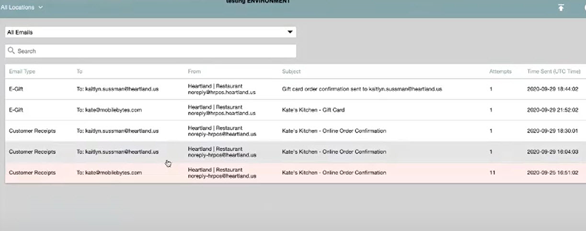
At the top of the screen, you can filter the emails displayed by selecting an email type (such as e-gift or customer receipts) in the Type list. The default selection is All Emails.
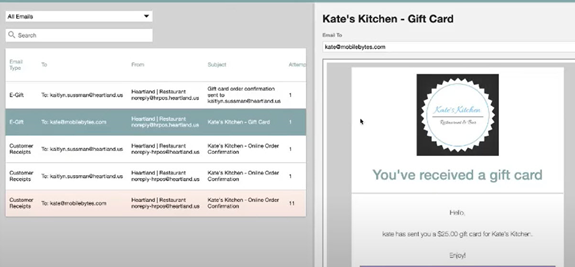
If you select an email in the list, the program will display the email in a preview window. If necessary, you can select an email, revise the email address in the Email To box, then click  . The program will resend the email.
HR-1596 Payment Gateway Audit Trail
We have added an audit trail to the Payment Gateway screen. In the Admin Console’s main Menu, click Location Settings, then click Payment Gateway. In the Payment Gateway screen, click  (in the bottom left corner). The program will display the Audit Trail screen.
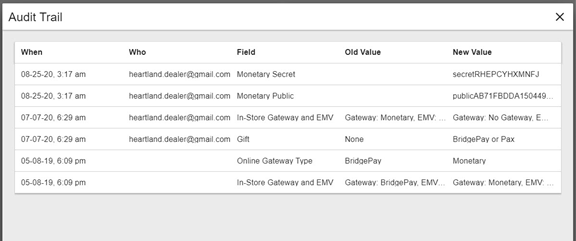
The Audit Trail screen displays a list of changes made to any setting in the Payment Gateway screen. For each event in the list, the program displays the time of the change, the name of the user who performed the change, the specific settings that were changed, the old value of each changed setting, and the new value of each changed setting.
Updates
The following release notes detail the updates we have included in this release. We have divided the updates by project area.
HR-1250 Daily Summary Report Displays Accurate Discounted Modifiers
In previous versions, the POS may have displayed inaccurate amounts for discounted modifiers in the Daily Summary Report. In the Pricing screen, you can create a set of pricing rules that the POS will automatically apply to a ticket when certain conditions are met. (In the Admin Console, click Account Menu, then click Pricing.)
However, in previous versions, when the POS applied such rules to the price of modifiers, the Daily Summary Report may not have displayed the modifier prices as discounted in the gross totals. We have corrected this, and the Daily Summary Report now displays accurate prices for discounted modifiers in the Gross totals column.
HR-1477 Signature Lines Printing on Credit Card Receipts
In the Admin Console’s Main Menu, click Location Setup, then click Rooms. View the settings of an existing room. In the Room Settings screen, if you select the Hide Credit Card Tips check box, you can set the POS to exclude the line for tips on printed credit card receipts. However, in previous versions, if you selected the Hide Credit Card Tips check box, the POS may have excluded both the line for tips and the line for the customer signature on printed credit card receipts. We have corrected this, and the POS no longer removes the signature line on credit card receipts when you set it to exclude the line for tips.
HR-1479 Voids and Recharges in Online Ordering with Verified Credit Cards
In previous versions, if you tried to add an item to an Online Order, the POS may have failed to use the existing verified credit card. For instance, you may have received a ticket from the Online Ordering menu and paid the ticket with a credit card. Later, if you reopened the check, added a new item then tried to submit the new ticket for payment, the POS may have been unable to recharge the existing card. Instead it may have displayed an “Unknown” error message. We have corrected this, and the POS can now perform voids and recharges in Online Order tickets with an existing verified credit card.
HR-1531 Paytronix Loyalty Rewards in Online Ordering
In previous versions, if your site uses the Paytronix loyalty service, you may have encountered a problem. In the Online Ordering website, if a customer tried to add a Paytronix reward to an order after redeeming a different reward, the website may have displayed an error message (“Unknown Error”). This error may also have appeared if the customer used the Guest app. We have corrected this, and the Online Ordering site (and the Guest app) no longer display an error message when a customer adds Paytronix rewards to an order.
HR-1623 Wait List Orders Sent to QSR Display
In previous versions, if you created a new ticket using the wait list in the POS Room screen, the POS may not have sent the orders on the ticket to the QSR display system. We have corrected this, and now when you create a new ticket or add an item to an existing ticket using the wait list, the POS will send the orders to the QSR display system.