Overview
The following release notes contains updated versions of the following files:
If you have questions regarding the updates described in this document, please contact Heartland Restaurant’s Support Department by email (hrpossupport@heartland.us ) or phone (1-833-844-HPOS).
What’s New?
The following release notes detail the updates we have included in this release. We have divided the updates by project area.
HR-1793 Valutec PAX Integration
We have added support for the Valutec PAX payment gateway. For detailed procedures for setting up a Heartland Restaurant site to use the Valutec PAX payment gateway, please review the “Valutec PAX Setup Guide”.
Audit Trails Added to Various Screens
We have added audit trails to various screens in the Admin Console. To view any of these audit trails, access the screen, then click  (in the bottom left corner). The program will display the audit trail for the specific screen. The Audit Trail lists all changes made to any record in the selected screen. For each event in the list, the program displays the time of the change, the name of the user who performed the change, the specific settings that were changed, the old value of each changed setting, and the new value of each changed setting.
In the Main Menu, under Location Setup, we have added audit trails to the following screens:
- Custom Tenders
- Paid In & Out Types
- Tip Out Types
- Staff
- Job Types
- Labor Categories
- Permissions
- Report Access
- Break Types
- Clock In Messages
- Payment Terminals
- Printers
- Display Formats
In the Main Menu, under Account Menu, we have added audit trails to the following screens:
- Items
- Sections
- Groups
- Attributes
- Kitchen Groups
- Report Categories
- Daypart Categories
- Revenue Centers
- Modifiers
- Ingredients
- Context Items
- Taxes
- Tax Groups
- Tags
- Pricing
- Adjustments
- Promotions
- Void Reasons
- Upsell Profiles
- Upsell Groups
In the Main Menu, under Loyalty Setup, we have added audit trails to the following screens:
- Membership Lists
- Email Marketing
Updates
The following release notes detail the updates we have included in this release. We have divided the updates by project area.
HR-787 Mobilebytes Wait List Text Messages Formatted Properly
In previous versions, on sites using Mobilebytes, you may have encountered a problem. When the POS sent a text alert message to a customers on the Wait List, the text may have been divided into multiple messages, and received out of proper order.
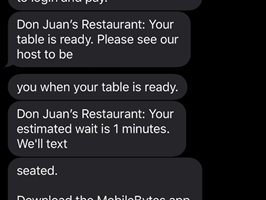
We have corrected this, and the POS now sends text alert messages properly. We have also shortened the URL links in the alert messages. In previous versions, the longer URL links may not have worked on some phones.
HR-1497 Searching for Menu Items with Apostrophes
In previous versions, if your site has menu items with names that include an apostrophe, the POS may have been unable to display those items in its search list. For instance, if you opened a new ticket, tapped the Search Menu box, and then entered a name with an apostrophe, the POS may not have displayed any items that matched the entered name. We have corrected this, and now if you enter an item name with an apostrophe, the POS displays matching items properly in the Search list.
HR-1760 Wait List and Scan to Pay SMS Messages
In previous versions, if your site uses both the Wait List and the Scan to Pay feature, the POS may have been unable to send SMS messages with payment links to customers. Specifically, if you added a customer to the wait list, added the customer to a table, ordered an item, sent the order to the prep printer, then tapped Info, then tapped SMS, the POS may have displayed an error message instead of sending the SMS message with the payment link. We have corrected this, and the POS now sends SMS payment messages properly to customers on sites that use the Wait List.
HR-1846 Voiding Adjustments from Paid Tickets
In previous versions, if you added an adjustment to a ticket, paid the ticket, reopened the ticket, and tried the void the adjustment, the POS may have voided the adjustment. We have corrected this, and the POS will no longer allow you to void an adjustment from a ticket after the ticket is paid.
HR-2011 POS Records PAX Payments Properly While Also Processing Scan to Pay Transactions
In previous versions, if your site uses the Scan to Pay feature with a PAX payment gateway, you may have encountered a problem when processing a payment for a split check. Specifically, if you split a check, paid one check with a PAX device and the other check with the Scan to Pay feature, the POS may have failed to record the payment information of the PAX transaction in the system's data. Specifically, if you tried to process both payments at the same time, both payments would have been received and processed successfully, but the system may have been unable to record the PAX payment in the site’s data. We have corrected this, and the POS now records PAX payment information properly, even if the payment was processed while also processing a Scan to Payment transaction.
HR-2348 Guest App Payment Option for Scan to Pay Tickets
In previous versions of the Guest app, if your site uses the Scan to Pay or Scan to Pay & Scan for Points options in the room settings, you may have encountered a problem. This problem occurred when a customer ordered an item with a required modifier and the ingredient(s) selected for that modifier are only available in house. When the customer scanned the printed ticket’s QR code, the app may not have displayed an option to pay. We have corrected this, and the Guest app now displays the payment option properly when customers scan a ticket’s QR code.