Overview
This article describes enhancements and updates to the following components:
- Online Ordering
Enhancements
The following release notes detail the enhancements we have included in this release.
HR-657 Business Name, Address, and Phone Number Added to Customer Emails
Description: We have added the customer’s business name, address, and telephone number to all emails.
Details: In the Online Ordering website, if a customer provides a business name, address, and telephone number, the program will include that information in all emails sent to the customer.
HR-864 Overlapping Time Ranges for Menu Group Schedules
Description: In Online Ordering, you can now set menu group schedules with overlapping time ranges.
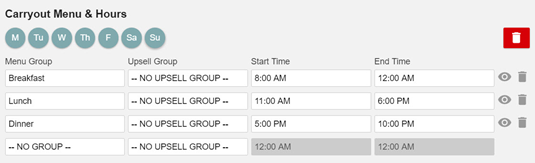
Details: In the Admin Console’s Main Menu, click Location Setup, then click Online Ordering. In the Online Ordering screen, click the Online Order tab. In the Schedules area, you can add schedules that determine when the items of specific menu groups are available for carryout and delivery service in the Online Ordering app.
In previous versions, the program did not allow you to set menu groups with overlapping time ranges. The program did not allow multiple menu groups to be available at the same time of day. We have modified this, and now you can set menu groups with overlapping time ranges.
For instance, you could set a “Breakfast” menu group with a time range of 8:00 AM to 12:00 AM, and then set a “Lunch” menu group with a time range of 11:00 AM to 4:00 PM. In such a case, if a customer accesses the Online Order website between 11:00 and 12:00, the program will allow the customer to order items from both the “Breakfast” and “Lunch” menu groups.
HR-892 Link Buttons Added to Online Ordering and Catering Websites
Description: We have added link buttons on the Online Ordering and Catering websites.
Details: If your location is set up to provide both an Online Ordering website and a Catering website, then the Online Ordering website will feature a Catering link button. If you click the button, you will access the Catering webpage. Likewise, the Catering website will feature an Online Ordering link button. If you click the button, you will access the Online Ordering webpage.
HR-893 Catering Service Website Now Available
Description: We have added Catering service to the Online Ordering website.
Details: To enable Catering service for a location, log into the Admin Console and select the appropriate account. In the Main Menu, click Account Info. In the Account Info screen, select the Catering check box. Once you enable the Catering service, the program will make the Catering controls visible and active in the Online Ordering screen. To access these controls, click Location Setup in the Main Menu, then click Online Ordering. In the Online Ordering screen, click the Catering tab.
For a full description of the Catering service options, review “Online Ordering Setup for Heartland Restaurant”.
HR-1012 Description Box Added to Attributes Settings Screen
Description: We have added the Description box to the Attributes Settings screen.
Details: In the Description box, you can type custom descriptive text, such as undercooked food warnings or disclaimers. In the Online Ordering website, Kiosk, or Guest, if a customer orders an item that is associated with an attribute with text in the Description box, the website or app will display that text to the customer.
HR-1039 Special Instructions Limited to 150 Characters
Description: We have limited special instructions to 150 characters.
Details: In the Online Ordering website, Guest, and Kiosk, special instructions are now limited to 150 characters. If customers enter special instructions for an order, they can only enter instructions of 150 characters or less.