Overview
The following release notes contains updated versions of the following files:
- POS
- Admin Console
- Online Ordering
- Guest
If you have questions regarding the updates described in this document, please contact Heartland Restaurant’s Support Department by email (hrpossupport@heartland.us ) or phone (1-833-844-HPOS).
What’s New?
The following release notes detail the updates we have included in this release. We have divided the updates by project area.
HR-1263 POS Sends Links to Contactless Payment Site by SMS
We have enhanced the contactless payment feature by enabling the POS to send an SMS text message with a link to the payment web site to a customer’s cell phone number. This can allow customers to perform contactless payments in environments where scanning QR codes might be awkward (such as a drive thru window).
For servers to use this option, you must set the room to use the Tab style and QR codes for payment. In the Admin Console’s Main Menu, click Location Setup, then click Rooms. In the Rooms screen, select the appropriate room. In the Type list, select the Tab option. In the QR Code list, select Scan for Pay or Scan for Pay and Scan for Points.
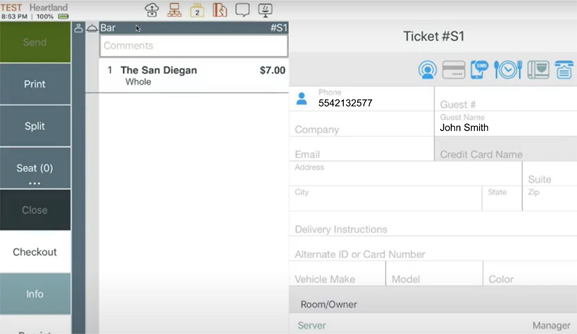
In the POS, after opening a ticket and sending the order, you can add a customer’s contact information, including the number of the customer’s cell phone. After entering and saving this information, if you click  , the POS will send an SMS text message to the customer, with a link to the payment website. Upon receiving the message, the customer can tap the link and finish performing the contactless payment.
HR-1307 Support for DAVO Sales Tax Integration
DAVO is sales tax on autopilot. With DAVO, Heartland customers never need to think or worry about sales tax management again.
DAVO Sales Tax integrates directly with Heartland Restaurant to automatically set aside sales tax funds daily, then files and pays sales tax to the state when due, on-time and in-full. Set up takes only 5 minutes and, with DAVO’s incredibly high customer satisfaction ratings, you can recommend DAVO to your customers with confidence.
HR-1426 Google Analytics Tags Added to Contactless Pay
We have added Google Analytics tags to all web pages for the Contactless Payment solution. This enables you to track when consumers use the Contactless Payment feature.
HR-1511 Improved Credit Card Validation and Interface
In the contactless payment feature, we have improved the interface of the Credit Card Info screen. We have modified the label of the Card box and added a placeholder message with a card icon. Also, we have modified the validation messages. If a customer adds information to some, but not all, of the required boxes and then tries to save the card, the app now specifies all fields that are required. In previous versions, the app may have only specified some of the required fields.
Updates
The following release notes detail the updates we have included in this release. We have divided the updates by project area.
HR-863 Reported Tips and End Time on Time Clock Reports
In previous versions, if you printed the Time Clock Report, the POS may have listed totals for reported tips and end times improperly. In such cases the totals were indented too far right. On the printed report, the POS may have misaligned these totals in the layout. As a result, the Reported Tips row would appear listed as the Duration Hours rather than the Reported Tips, and the End Time row would appear listed as Overtime Hours instead of the Duration Hours. We have corrected this, and the POS now prints Reported Tips and End Time totals properly aligned on the Time Clock Report.
HR-1083 Online Ordering Menu Overrides with No Menu Groups
In previous versions, if you added a Menu & Hours Override to the Online Ordering website and set it to use No Groups, the online Ordering website may not have saved the setting. In the Admin Console’s Main Menu, click Location Setup, then click Online Ordering. Click the Online Ordering tab. At the bottom if the screen, you can add one or more Menu & Hours Overrides to the Online Ordering website.
However, in previous versions, if you added an override, added one or more specific dates, selected No Group in the Menu Group list, then clicked  , the program may not have saved the override. The program was unable to save an override set to use no specific menu groups. We have corrected this, and now you can add and save Menu & Hours Overrides that are set to use no specific menu groups.
HR-1479 Recharges and Voids on Online Order Tickets
In previous versions, if you tried to add an item to an Online Order, the POS may have failed to use the existing verified credit card. For instance, you may have received a ticket from the Online Ordering menu and paid the ticket with a credit card. Later, if you reopened the check, added a new item then tried to submit the new ticket for payment, the POS may have been unable to recharge the existing card. Instead it may have displayed an “Unknown” error message. We have corrected this, and the POS can now perform voids and recharges in Online Order tickets with an existing verified credit card.
HR-1508 Back Button Does Not Return to Payment Screen
In previous versions, after successfully paying a ticket using the contactless payment feature (with either Apple Pay or a credit card), if you clicked the Back arrow in your web browser, the program may have returned to the Payment screen, allowing you to reenter payment information and pay for the ticket again. We have corrected that, and now when you click the Back button after a successful payment with contactless pay, the program will access the “Finished” screen, not the Payment screen.
HR-1509 Voids on PAX Devices Do Not Crash POS
In previous versions, if your site tried to void an EMV transaction on a PAX device, it might have caused the POS to close abruptly. This problem only occurred on sites that enabled the Cancel Running EMV Transactions feature (set in the Location Settings screen), and that use the Legacy PAX interface option (set in the Payment Gateway screen). We have corrected this, and now when you void an EMV transaction on a PAX device, the POS does not close.
HR-1544 Integrations List Now Visible to Resellers
In the Admin Console’s Main Menu, select an appropriate account, then click Integrations. In the Integrations screen, the program displays a list of the integration currently enabled for the account. However, in previous versions, the Admin Console may have only displayed the list of integrations for users with Admin privileges. We have corrected this, and the Admin Console now displays the integrations list for users with dealer and reseller privileges.
HR-1566 No Delay for Updates on QSR Display
In previous versions, if your site uses the QSR display, the program may have experienced a delay (of up to 30 seconds) when updating a ticket in the QSR display screen. This problem may have occurred on sites that did not set up a secondary server for the QSR service. In such cases, the program was waiting for a confirmation from both the primary and secondary server before displaying the updated ticket information. We have corrected this, and the program now displays updated ticket information in the QSR display without a 30-second delay.
HR-1575 Online Ordering Stores Credit Card Info Properly
In previous versions, when a customer logged into the online ordering website, added a new credit card to pay for a ticket, and saved the new card information, then the website may have failed to save the new credit card’s information. We have corrected this, and the online ordering website now saves new credit card payment methods and details properly.
HR-1603 POS Can Add Tips to Online Order Tickets
In previous versions, if a customer paid a ticket in the Online Ordering website with a credit card, the POS may not have allowed you to add a tip to the order. In such cases, the tip option was disabled for the Online Ordering website. In the POS, if you tried to add a tip to a ticket, the app would simply fail to add the tip. We have corrected this, and you can now add a tip to a ticket in the POS after it is received from the Online Ordering website.