Overview
This document describes the following enhancements and updates:
- Daily Summary
- eCommerce Integrations
- Gift Card
- Global Settings
- Point of Sale
- Product Catalog
- Roles and Permissions
- Sales Dashboard
If you have questions regarding the updates described in this document, please contact the Heartland Retail support team.
Enhancements
The following release notes detail the enhancements we have included in this release.
Added Heartland InfoCentral Link to POS
We have made a link available for Heartland InfoCentral (HIC) within the POS. HIC is a tool provided by Heartland Payments Systems to review your processing statements and daily batches, and to validate funding. To access HIC, from the Manager menu of POS, select Heartland InfoCentral.
For more information on Heartland InfoCentral, please refer to our FAQ.
Added Heartland Retail EULA Acceptance Requirement
Admin users must now indicate acceptance to our EULA in order to use the program. If, as an Admin, you have not yet accepted, upon logging into Heartland Retail, you will be presented with the EULA with the option to accept or decline.
- If you decline, the program will close.
- If you accept, the program will record the time and date of acceptance and allow you to proceed.
This behavior is true for both the web and mobile versions of Heartland Retail.
Added Cash Denonimation View to Daily Summary
You can now view cash denomination information for closed cash drawers directly from the Daily Summary screen of Heartland Retail. In order to use this feature, do the following:
- Enable the View cash denominations on Daily Summary permission for desired roles.
- Log into the POS under a user with an eligible role assignment.
- Select Point of Sale | Options | Daily Summary.
- From the ‘DAILY SALES AND PAYMENTS SUMMARY’ screen, select the desired Date, Location. and Station. You can now view cash drawer events matching the specified parameters.
- Select Print, then Cash Denominations. This will produce a printed summary of all closed cash drawer events.
Please note: If there are no closed events for the specified parameters, the Cash Denominations option will be grayed out.
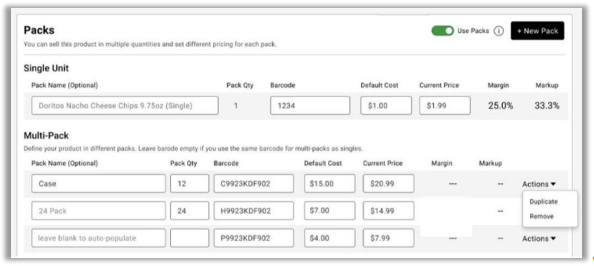
Added Case Pack Settings & Requirements
For products with Use Packs enabled, you can now enter additional detailed information about the product packs via the new Packs settings module. With this additional information, merchants can easily track associated pack sales data back to the single unit product.
Updates
The following release notes detail the updates we have included in this release.
- Fixed Gift Card Only Orders Showing in Fulfillment Alerts
- Fixed Issue with BigCommerce Gift Card Flag
- Fixed Financial Mapping for Merchandise Payment Type
- Fixed Heartland Gift Card Return Issue
- Fixed Heartland Gift Card Activation Issue
- Fixed Issue with iOS App Not Printing Multiple Item Labels
- Fixed Abandoned Reporting Requests Behavior
- Added Option to Hide Salesforce Chat