Overview
This document contains explanations for the following enhancements:
- Mobile App
If you have questions regarding the updates described in this document, please contact Heartland Mobile Manager Support by email at hmm@heartland.us.
Enhancements
The following release notes detail the enhancements we have included in this release.
Mobile App
HMM-6289 – Implement Minpoint and Maxpoint Validation in LIVE Heat Map Rules
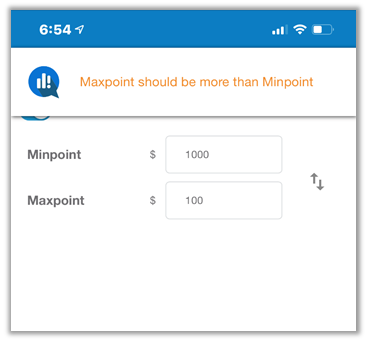
In previous versions, when setting Minpoint and Maxpoint values for the LIVE Heat Map rules, the app did not require the maximum value to be greater than the minimum value. With this release, the app checks the values upon saving and, if the maximum value is not greater than the minimum, it displays a message to that effect so you can correct the values.
HMM-6312 – Add Date Header to LIVE Heat Map
For added clarity, we have added a date header to the LIVE Heat Map.
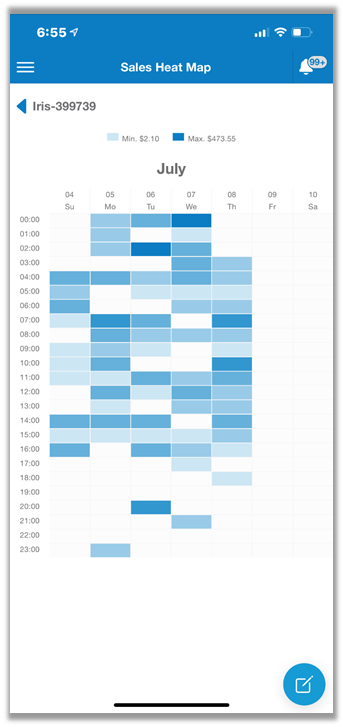
This header displays above the weekday header and includes the month(s) and day.
HMM-6365 – Add ‘Swap’ Button to LIVE Heat Map Rules Page
So that users can easily reverse values set in the Minpoint and Maxpoint fields if they entered them in opposite fields by mistake (for example, 1000 for Minpoint and 100 for Maxpoint), we have added a swap button to the right of the fields.
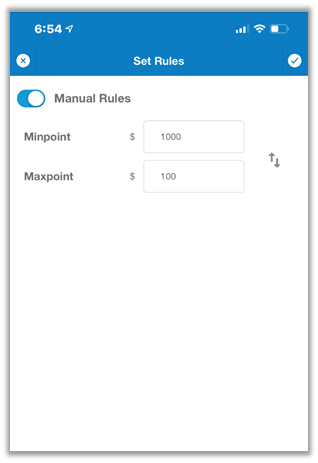
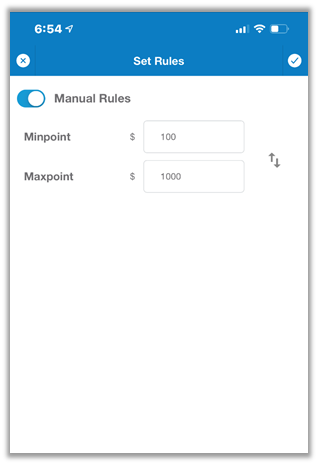
If you tap this button, the app will swap the Minpoint and Maxpoint values.
HMM-6773 – Remove Store Selection from LIVE Heat Map Rules Page
The mobile app now automatically attributes any changes to the LIVE Heat Map rules to the store selected by the user upon entering the rules page. Given this new behavior, we have removed the store selection section from the LIVE Heat Map rules page.