Overview
This document contains explanations for the following enhancements:
- Mobile App
- Admin Console
If you have questions regarding the updates described in this document, please contact Heartland
Mobile Manager Support by email at hmm@heartland.com.
Enhancements
The following release notes detail the enhancements we have included in this release.
Mobile App
HMM-5995 - Implemented Manual Calculation Mode in LIVE Heat Map
With this release, you can manual set minimum and maximum values for sales calculations on the
LIVE heat map.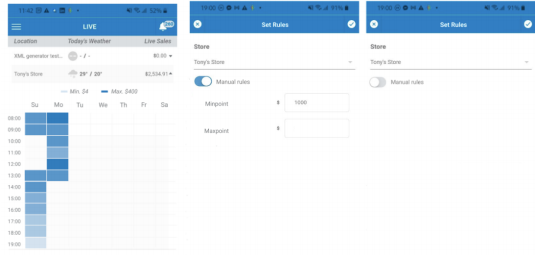
To use this feature, do the following:
- Select the desired store from the LIVE page and tap the pencil icon. This will open the ‘Set
Rules’ page. - Toggle the Manual Rules to enable.
- Enter values in the Minpoint and Maxpoint boxes that appear.
- Tap the checkmark in the upper right corner to save your changes. A ‘Rules were set!’ toast
message will display.
By default, Manual Rules is disabled. With Manual Rules enabled, and defined Minpoint and
Maxpoint values, the system will ignore anything outside of the defined range when calculating sales.
Therefore, anything below the Minpoint, and anything above the Maxpoint, will not be included in
calculations.
HMM-6278– Allow Decimals for LIVE Heat Map Manual Rules
Store owners can now use decimals when setting minimum and maximum values for manual rules in
the LIVE heat map page.
HMM-6315 – Hide Float Button When LIVE Toast Message Displays
With this release, when a store owner selects a cell from the LIVE heat map, the app automatically
hides the float button as2q it displays the toast message for the selected cell. Then, when the store
owner swipes downward to dismiss the toast message, it disappears and the app displays the float
button once again.
Admin Console
HMM-6087 – Make Zip Code and Country Fields Editable
You can now edit Zip Code and Country fields in the Admin Console for both Salesforce and nonSalesforce stores.
Please note:
-
This feature is available only to users with Super Admin and Admin roles.
- The Country field is a selector with United States of America (US) and Canada (CA) options.
- The Zip Code field is an input field.
- Neither of these fields is required.