Overview
This document contains explanations for the following enhancements and updates:
- Mobile App
- Admin Console
If you have questions regarding the updates described in this document, please contact Heartland
Mobile Manager Support by email at hmm@heartland.us.
Enhancements
The following release notes detail the enhancements we have included in this release. We have
divided these by project area.
Mobile App
HMM-4269 – Implement Dashboard Feature
We have added a Dashboard page to the mobile app that includes a header with scrollable tabs, each
containing type selection values (Sale, Void, Discount, Refunds, Tips, Labor), a filter selector, and a
dynamic body comprised of graphs reflecting the selected data, as compared from two corresponding
periods of time (such as ‘Today vs Same day last week’).
HMM-4848 – Implement Goal Feature on Dashboard
Users can now set sales goals for their stores, either individually, or across all stores. You can set
goals by Day, Week, or Month.
To use this feature, do the following:
- Tap the create icon in the lower right corner of the Dashboard screen.This will open the Set
Sales Goals screen. By default, All Stores will be selected. - If you wish to set goals for stores individually, toggle off the All Stores selection to open a
page listing individual stores. - Enter values in the fields as desired and tap the checkmark icon to confirm.

Once you have set your goals, the app will return you to the Dashboard and will display your goal
amounts with an orange dashed line, as indicated in the graph legend.
HMM-4437 – Enhanced Screen Loading for Slower Connections
Instead of the spinner, the mobile app now displays the outlines of elements as it begins to load each
page. This is useful when the Internet is slow so users can see that the app is making progress in
loading.
HMM-4849 – Add Dashboard to Default Page Selection
You can set the newly added Dashboard page as your default page. To do so, tap the menu icon in
the upper left corner and go to Settings. Select Default Page and then select Dashboard.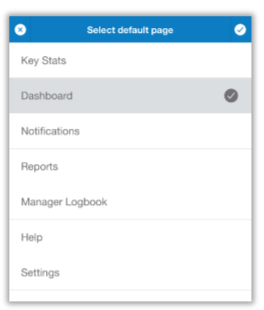
HMM-4975 – Implement First Drill-Down Level on Dashboard
With the new Dashboard feature, we also introduce a first-level drill-down on all graphs. By tapping
any of the Dashboard sales graphs, users can view the reflected data broken down by store, with
each store having its own graph.
HMM-4933 – Show ‘Report Preview’ Validation Messages for Report Creation
The mobile app now validates selections during report creation and, if required fields are left blank
when a user selects Report Preview, it will display a message informing them of the missing
requirement(s) so they can correct the issue(s).
Admin Console
HMM-4923 – Update UI for Log-In Screen
To strengthen the Heartland brand identity, we have updated the log-in screen so that it is similar to
other Heartland products.
HMM-4384 – Implement Fixed Position for Alerts
For consistency between pages, the Admin Console now displays all alerts in the same position at the
top of the screen.
Alerts will behave as before, depending on their message and purpose. For example, an alert that
does not require user interaction will disappear after a few seconds unless the user taps the X to
close it sooner.
HMM-4475 – Match Key Stats Date Selection Subheader to Mobile App
To better match the mobile app, we have updated the Admin Console’s user interface to display the
Key Stats date selection subheader in the same manner as the mobile app, and to allow users to
quickly change the date selection with a simple right or left scroll.
HMM-3016 – Improve Total / Unique Active Users Calculation
We have changed the way the Admin Console records and calculates active users so the information
is more useful. Previously, it calculated as follows:
- Total Active Users - The total number of times users logged into the Admin Console during a
specified time interval. - Unique Active Users - The total number of times a unique user logged into the Admin Console
during a specified time interval.
With this release, it calculates as follows:
- Total Active Users - The total user sessions in the Admin Console during a specified time
interval. - Unique Active Users - The total unique user sessions in the Admin Console during a specified
time interval.
The related graphs on the Executive Dashboard reflect these new calculations, resulting in more
useful and easily understood data.