Overview
This document contains explanations for the following enhancements and updates:
- Mobile App
- Admin Console
If you have questions regarding the updates described in this document, please contact Heartland Mobile
Manager Support by email at hmm@heartland.us.
Enhancements
The following release notes detail the enhancements we have included in this release. We have divided these by project area.
Mobile App
HMM-3615 – Added Edit Feature to Reports
Description: The mobile app now allows users to edit reports and save changes.
Details: For added convenience, the mobile app now allows store owners to edit existing reports and
save changes directly in the app. To edit a report, simply touch the edit icon in the lower right corner.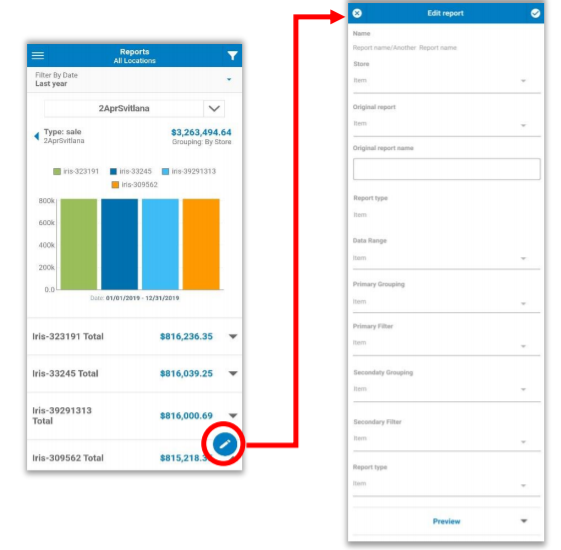
This opens the edit screen where you can make desired changes.
HMM-3619 – Added Edit Feature to Key Stats Parameters
Description: The mobile app now allows users to edit Key Stats parameters and save changes.
Details: For added convenience, the mobile app now allows store owners to edit Key Stats metrics and
save changes directly in the app. To change parameters, simply touch the edit icon in the lower right corner.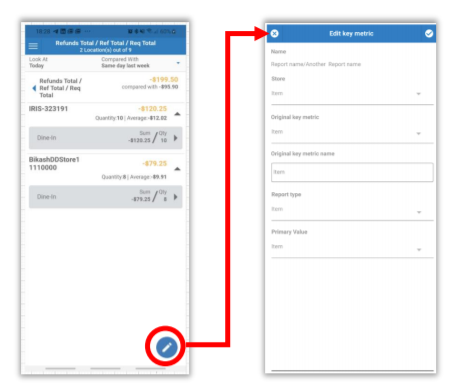
This opens the edit screen where you can make desired changes.
HMM-3629 – Added Preview Function to Edit Report Screen
Description: We have added a Preview function to the Edit Report screen.
Details: So that store owners can more easily choose the report configuration that is most to their liking,
we have added a Preview function to the Edit Reports screen.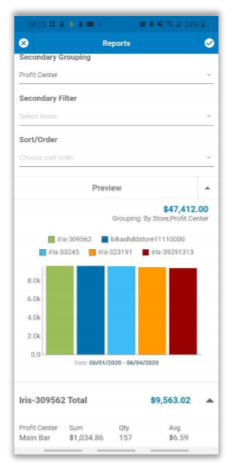
HMM-3630 – Added Notification for Simultaneous Editing of Key Stats Metrics
Description: The mobile app now notifies you if you and another user are simultaneously editing Key Stats metrics.
Details: With this release, the mobile app now notifies you if you and another user are simultaneously
editing Key Stats metrics. When this occurs, if one user saves changes, the app will inform the other user with a message reading, “This key metric was updated by UserName who saved changes. Continuing will overwrite these changes. Do you want to continue?”. If you select Cancel, the app will return you to view mode with a confirmation prompt reading, “Are you sure you want to discard your changes?” If you select OK, the app will keep you in edit mode.
HMM-3631 – Added Notification for Simultaneous Editing of Reports
Description: The mobile app now notifies you if you and another user are simultaneously editing Reports.
Details: With this release, the mobile app now notifies you if you and another user are simultaneously
editing Reports. When this occurs, if one user saves changes, the app will inform the other user with a message reading, “This report was updated by UserName who saved changes. Continuing will overwrite these changes. Do you want to continue?”. If you select Cancel, the app will return you to view mode with a confirmation prompt reading, “Are you sure you want to discard your changes?” If you select OK, the app will keep you in edit mode.
HMM-3635 – Added Create Report Feature
Description: You can now create reports in the mobile app.
Details: You can now create reports with new configurations directly in the mobile app. To do so, select
the + icon in the lower right corner of the Reports page.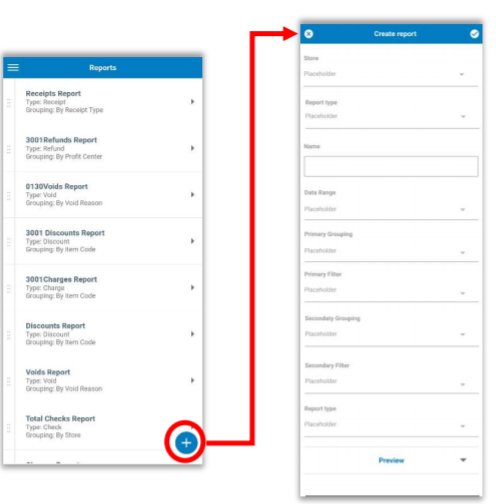
This will open the Create Report page where you can set parameters as desired.
HMM-3650 – Added Delete Report Feature
Description: You can now delete reports from the mobile app.
Details: You can now delete reports directly in the mobile app. To do so, highlight the report you wish to
delete from the Reports page and then select the delete (trashcan) icon in the upper right corner of the screen. 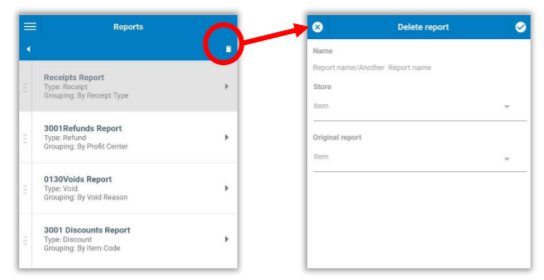
This will open the Delete Report page to confirm the action.
Please note: You can only delete one report at a time.
Admin Console
HMM-3858 – Added ‘Heartland Restaurant’ and ‘Heartland Retail’ to POS Types
Description: We have added “Heartland Restaurant” and “Heartland Retail” to the available POS types.
Details: We have added “Heartland Restaurant” and “Heartland Retail” to the available POS types for
new and existing stores on the Admin Console,
HMM-3669 – Updated Report Grouping Headings to Match Mobile App
Description: We have updated report group headings in Admin Console reports to match the mobile app.
Details: For the more clarity and consistency between the Admin Console and the mobile app, we have
updated report group headings in the Admin Console to match those in the mobile app.
HMM-3692 – Updated User Interface for Entities Created in Central API
Description: We have added identifiers to all entity pages to indicate entities created in Central API.
Details: So that they may be more easily identified, each entity page now displays a prefilled Salesforce
ID field for entities created in the Central API.
- Store page for stores created in Central API will include Store Salesforce ID above the Registration
Number. - Dealer page for dealers created in Central API will include Dealer Salesforce ID below the Name.
- Client page for clients created in Central API will include Client Salesforce Identifier below the Brand.
HMM-3785 – Added Option to Change Linked Client for Stores and Store Owners
Description: You can now change linked clients for stores and store owners.
Details: You can now change linked clients for stores and store owners. If you change the client for a
store, it automatically unlinks the existing Store Owner, and resets all Reports, Key Stats, and Push settings to default values.
HMM-3960 – Allow Editing of Salesforce ID Fields with Validation Rules
Description: You can now edit the Salesforce ID fields for entities.
Details: You can now edit the Salesforce IDs for entities. When you enter a new value for any of these fields (Store Salesforce ID, Dealer Salesforce ID, or Client Salesforce Identifier), the program will automatically validate the newly entered ID and will display an appropriate message when requirements are not met.
- If you do not enter a value in a required field: 'This field is required.'
- If you do not enter both letters and numbers for an alphanumeric field: 'This field must contain both letters and numbers.'
- If you enter fewer than 18 characters: 'This field must contain at least 18 characters.
HMM-3961 – Added Salesforce ID Fields to ‘Create Entity’
Description: We have added a Salesforce ID field to all ‘create entity’ forms.
Details: We have added a Salesforce ID field to all ‘create entity’ forms, with names as described in HMM-3692 above. The Admin Console will validate all entries upon saving, with validation rules as described in HMM-3960 above, and will only save validated data.