Overview
This document contains explanations for the following enhancements and updates:
- Mobile App
- Admin Console
If you have questions regarding the updates described in this document, please contact Heartland Mobile
Manager Support by email at hmm@heartland.us.
Enhancements
The following release notes detail the enhancements we have included in this release. We have divided these by project area.
Mobile App
HMM-3920 – Implemented ‘Edit Notifications’ Feature
Description: You can now edit notifications preferences directly via the mobile app.
Details: With this release, we have added the ability to edit push notification settings directly via the
mobile app, using the same rules as the Admin Console.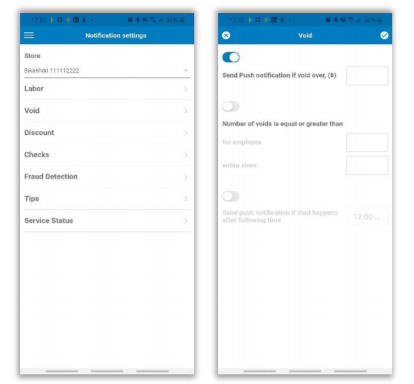
Once you have made changes and saved, you will receive a toast confirmation message. If you make changes and attempt to exit the page without saving, the program will notify you and give you the option to return to the page to save or Discard.
HMM-3481 – Added Statuses for Notifications
Description: The mobile app now displays notifications in a manner that indicates whether or not they have been read.
Details: With this release, the mobile app differentiates notifications by ‘read’ status.
- Unread messages display in bold font with a grey background.
- Read messages display in normal font with a white background.
HMM-3466 – Added New Notification Type for Heartland Messages
Description: We have added a new notification type for Heartland promotional messages.
Details: We have added a new notification type for Heartland promotional messages called Heartland
Messages. You can enable/disable these notifications by toggling on/off from the Notifications settings page.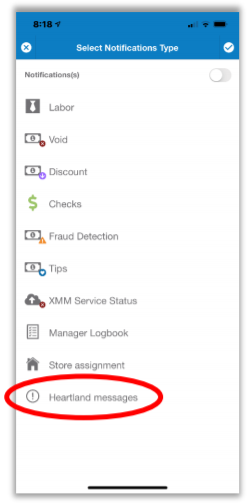
When a notification displays, you can tap it to display the associated promotional message.
HMM-3509 – Implemented Interactive Toast Messages
Description: The mobile app’s toast messages are now interactive.
Details: With this release, if you tap a toast message, the mobile app will redirect you to the related
view. For example, if you tap a toast message related to a notification, the program will take you to the
notifications list view so that you may easily view the related entry.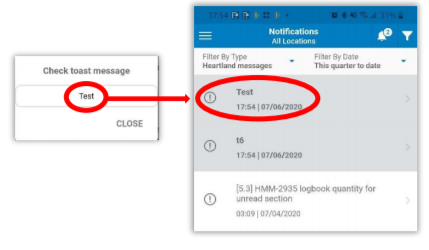
HMM-3468 – Implemented Unread Notifications Counter
Description: The mobile app now tracks and displays the number of unread notifications.
Details: The mobile app now displays a bell icon at the top of the page with a counter indicating the
number of unread notifications for the current user. If there are no unread messages, the bell icon will display without a number.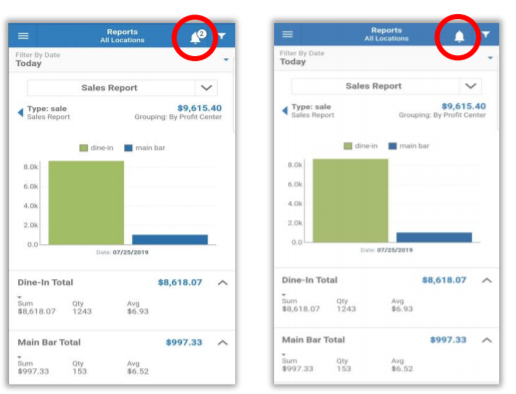
Please note: The unread counter displays the total of ALL unread notifications, regardless of date filter.
HMM-3471 – Renamed Page Titles and Headings
Description: We have renamed Account and Alerts pages to Settings and Notifications.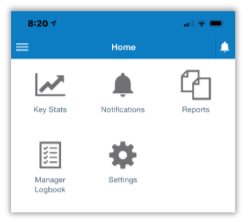
Details: We have given more suitable names to the Account and Alerts pages in the mobile app.
- Account is now Settings.
- Alerts is now Notifications.
HMM-3695 – Improved ‘Pull to Refresh’ for Screens with Real-Time Updating
Description: We have improved the behavior when using Pull to Refresh function in mobile app.
Details: In previous releases, it was not clear whether data was up-to-date on Reports, Manager
Logbook, and Notifications pages. With this release, if you use Pull to Refresh at the top of any of these pages, once the refresh is complete, a Real-Time heading replaces Pull to Refresh. This allows users to see that the data is already up-to-date and that they do not need to refresh.
HMM-3727 – Removed ‘Select One’ Heading
Description: We have removed the Select One heading from pages with a single selection view.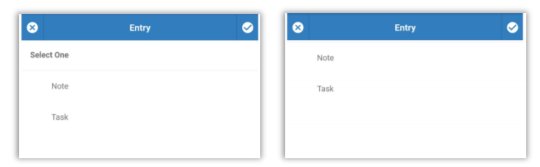
Details: Since it served no purpose, we have removed the Select One heading from pages with a single
selection view, as in the Manager Logbook creation page pictured above.
HMM-3942 – Implemented ‘Share Report’ Feature
Description: We have added the option to share reports viewed from the mobile app.
Details: You can now share mobile app reports with others by tapping the Share Report button after
generating the report. This button opens sharing options as defined on your device, thereby allowing you to share via SMS, MMS, email, social media, etc.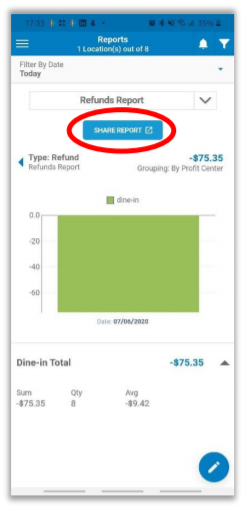
Please note: The shared report is simply a snapshot and will not reflect new data.
Admin Console
HMM-3465 – Implemented New Module for Promotional Messages
Description: We have added a new module for promotional messages.
Details: We have added a new module for creating and sending promotional messages to mobile
app users. You can configure these messages with a Learn More button linked to an external pop-up, and track whether or not a user taps the button. You can also configure messages to be resent with regular frequency until a user taps the Learn More button.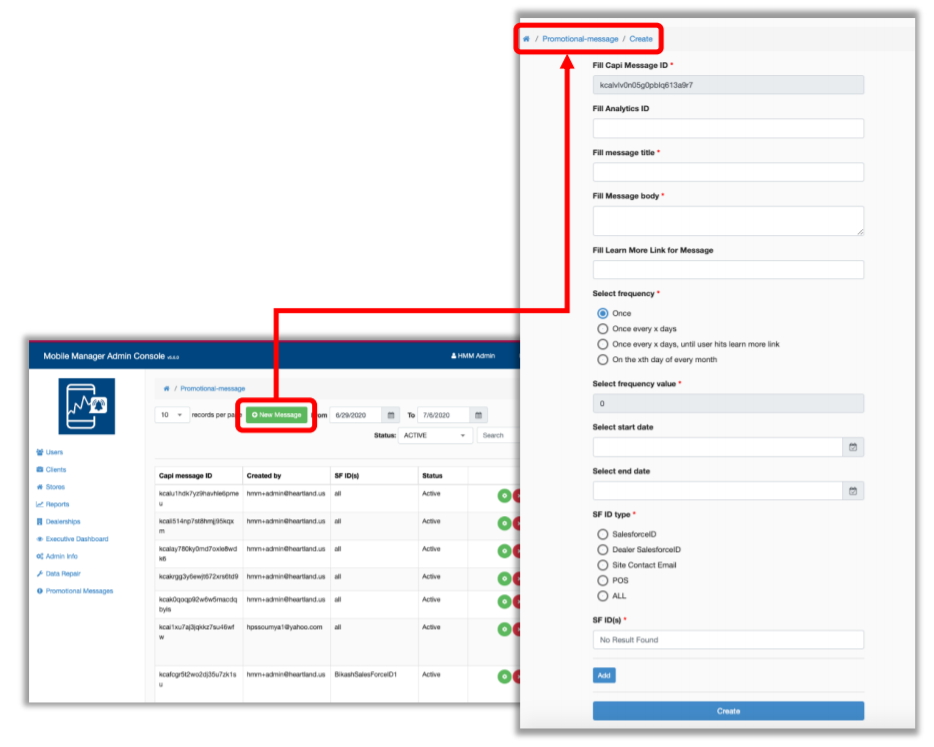
HMM-3517 – Added Data Processing of Promotional Messages
Description: We have added the ability to process activity related to promotional messages.
Details: We have added the ability to process user interaction with promotional messages (for example,
if/when they click Learn More), and to view the status of each message (for example, expired or deleted).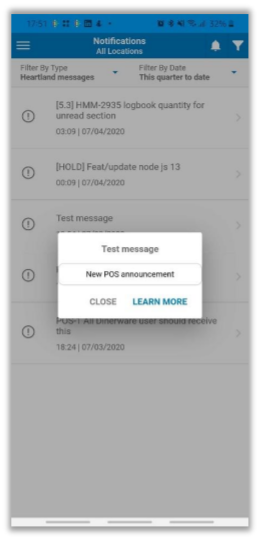
If a user tries to open an expired or deleted message on the mobile app, the program will inform them of this.
HMM-3565 – Display Deleted Entities
Description: The Admin Console now displays deleted entities.
Details: So that users have more information about linked entities, the Admin Console now includes
deleted entities in all pages. These entries are listed in grey strikethrough font and are unclickable.
HMM-3727 – Clarified ‘Confirm Updating’ Message
Description: We have clarified the confirmation message when updating store assignments.
Details: In previous versions, the confirmation message when updating store assignments was unclear.
With this release, we have clarified the message so that users can easily understand the actions indicated
before saving.
HMM-3921 – Improved Validation Process in ‘Create Dealership’ Page
Description: We have improved the validation process in the Create Dealership page.
Details: To minimize errors and confusion, we have improved the validation process in the Create
Dealership page so the user can easily see what is required when creating a new dealership.
HMM-3930 – Removed ‘For Store’ Labor Push Settings from Store Page
Description: We have removed the For Store selection from Labor Push Settings on Store page.
Details: Since it served no purpose, we have removed the For Store selection from Labor Push Settings
on Store page.