Disclosure
This document was created for the authorized dealer community. It is private and contains confidential
information. It is intended for internal dealer use only and is not to be given in printed or electronic
format to end-users or third-party companies.
Program Overview
Attract More Customers, Retain Existing Clients and Grow Recurring Revenue
Heartland’s newest mobile application, Mobile Manager, gives time crunched business owners
actionable information in real time. Any Android or iOS phone / tablet can securely access information
from anywhere to manage operations. Discover and solve problems and reduce the need to remotely
access to your POS. Safely connect to your hosted data for Sales, Payments, Voids, Discounts,
Labor, and Security information. Designed for single and multiple unit operators, Mobile Manager
makes it simple to control one or many operations from one login.
Reporting with Historical Comparison
Current and historical information is easily shown within the native application, this allows management to understand trends and predict future activity. Optimized for speed, the app retrieves large amounts of data efficiently. Mobile Manager compares sales or discounts for a time and date range. Coloring on data makes understanding positive or negative trends simple.
Users can personalize their mobile reporting experience with preferred Sales, Labor, Voids, Discounts, or Security data views. Graphical and spreadsheet views can be changed with a click.
Alerts in Mobile Manager send notifications about security and operation problems. Alerts are instant and show full check detail. Alerts are delivered to the mobile device and work from anywhere. Sales can also be delivered on a timed basis so you don’t have to access the app to view the information. Each staff member can have different setup preferences, helping maintain daily profitability. Mobile Manager is cloud based allowing you to manage users and system configuration from a web browser.
Mobile Manager is a native mobile analytic and alerting tool sold exclusively by Authorized Dealers.
Mobile Manager does not work outside of the Heartland POS product family and can not be used in a stand-alone capacity.
Pricing
Mobile Manager Pricing
Mobile Manager pricing is per month, per store. Dealers can adjust pricing between the minimum and maximum per month, per location.
Heartland bills customers directly and billing will follow the standard SaaS policy.
The dealer will receive their normal commision % of the billed monthly price per location. Dealers will also be able to charge for setup (PIT) that is 100% paid to the Dealer like normal POS installation fees.
There is no perpetual licensing option for this SKU. The contract term for this SKU is month to month. Cancellation and Termination details are covered in the Heartland POS Agreement, located in Salesforce under Resources.
If a dealer is utilizing “shared support”, then Heartland will provide basic boarding and assistance to the end merchant. If this fee is not charged, Heartland will not engage the end user.
Installation / Setup
Operations will not charge any activation fees for newly boarded customers. However, the dealer can charge any appropriate fees directly to the customer for their professional services. It is estimated that approximately 2 hours of time is required for training and building each store location. This time will vary based on client / dealer expertise and complexity. Dealers should NOT expect Heartland to perform professional service without prior written consent by both parties.
Program Rules of Engagement
Feedback
- Heartland may solicit feedback on the application and expects reasonable participation in surveys, town halls, emails and phone calls regarding the product. All customer communications as appropriate, will be channeled through the supporting dealer. However, Heartland reserves the right to contact customers directly at its discretion.
- Dealers and End-Users must be willing and able to give feedback to Heartland about the performance and features of this product. The dealership agrees to install all necessary files for both app and POS software. The dealer must confirm during business hours that the installation and program is functioning properly. If needed, the dealership must agree to update the site with patches as they become available.
Change/Enhancement Requests
Change or enhancement requests should be submitted through the Ideas Portal.
Order Process
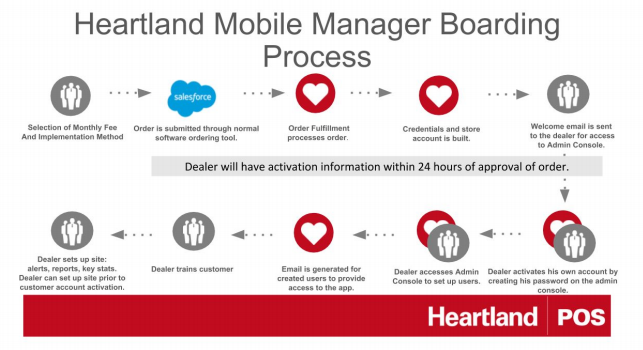
Dealers will submit orders for the Mobile Manager through Salesforce. A new item has been added to the order forms “Mobile Manager”.
This SKU has been added to the invoicing system. Merchant ACH documentation is required as Heartland will manage SaaS billing.
Dealers must have a current Dealer Agreement with ACH information on file or submit one with the Mobile Manager application and product order.
Dealer Responsibilities
Pre-sales proposals
Dealers will be responsible for presenting proposals for Mobile Manager to existing compatible customers as additional add-ons or within a larger solution package to merchants. Heartland is willing to assist with large or complex merchant opportunities. The dealer will still be given full sales and compensation credit for prospects that Heartland assists with closing. Dealers are expected to cover basic Mobile Manager functionality. Pricing the solution within the above guidelines and completing any necessary documentation.
Client enrollment
Dealers are responsible for entering the Mobile Manager orders into Salesforce.
Mobile Manager Terms and Conditions must be provided to the merchant at the time of submitting the order, and will be delivered via DocuSign within Salesforce.
If you have questions regarding placing an order or an existing order you can send an email to
Orders@Heartland.us. The dealer will receive, within 24 business hours, activation information in the Mobile Manager online tool; this delivery window starts with approval of order.
Program Training and Implementation
The dealer will install and configure Mobile Manager. Help configuring the POS application and Mobile
Manager App can be directed to the primary dealer support channel.
- For Heartland Restaurant: There is no POS Configuration required by Dealers for Heartland
Restaurant to communicate with Mobile Manager. The Mobile Manager account is created and
linked to the Heartland Restaurant site during fulfillment. The only setup and configuration
required is on the Mobile Manager Admin Console and App.
Questions regarding the boarding information can be directed to Order Support. Contact information is
available in the Salesforce Rolodex.
The dealer will set up store users in the Admin Console. Access to the Admin Console will be received
in the welcome email sent to the dealer after the order is credentials and account are created. Once
access is set up the secure link to the Admin Console is: https://mobilemanager.heartland.us.
The dealer will train and test with the customer core functionality of logging in, navigation and key
system features. Report training and portal access will also be given to the customer from the dealer
and training for this will be determined by the dealer’s support arrangement.
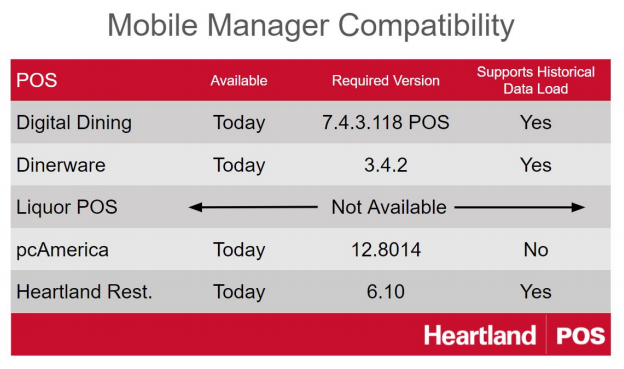
Point Of Sale Version Compatibility
Sandbox Accounts for Sales Demonstrations (Demos)
Dealers can download the Mobile Manager Analytics app from either App Store or Google Play Store.
(Search on Heartland Payment Systems for quickest access).
Use the following login credentials to view the Mobile Manager app:
Username: mm-demo@heartland.us
Password: Hpos1234
Merchant Support Levels
Tier 1: Dealer will handle:
- Functionality on the Mobile Manager application.
- Reporting
- Configuring and implementation.
- Billing questions
Tier 2: Heartland will support:
- Issues with program outages
- Dealer support for configuration, deployment and technical escalations.
- Billing escalations
Response Times
Dealer Resources, Escalation and Response Times Total Average Time for Product Activation:
1 Business Day
Times listed are average delivery expectations and do not reflect delays from dealer or customer
situations.
Order Processed: Order completed in Salesforce to process (1 Business Day)
Dealer and End User Credentials Emailed: Immediately upon processing
Contact by Technical Team for Configuration: (NA )
Shipping: (NA)
Dealer Resources and Escalation Information
Training on Mobile Manager boarding process, tools, and reporting will be done on a periodic basis
and provided by Sales Support team via webinars.
Prior to being issued your first implementation, at least one member of the dealership must complete
the training program.
Boarding and Implementation Support: Orders@Heartland.us
Product Technical Support: Contact your POS Technical Support
Accounting and Billing Questions: Accounting@Heartland.us