Overview
This document describes the following updates:
- Heartland Retail Connect
- Payment Processing
- Point of Sale
If you have questions regarding the updates described in this document, please contact the Heartland Retail support team.
What’s New
The following release notes detail the enhancements we have included in this release.
HRTL-3320 – Display Price Lists on Item Records for Gridded Items
So that merchants can easily view and compare location-based pricing for gridded items, the POS now displays item price lists on the item record, in the same manner as for non-gridded items. The price list fields will reflect the set prices for each specific item variant, and not those from the parent grid.
HRTL-3419 – Hide Payment Resolution Status for In-Progress Payments
Previously, if a card payment was in progress on the payment device, the POS would display an orange error bar in the background and would list the payment as ‘unresolved’ in the payments list. To eliminate possible confusion resulting from this, with this release, instead of the orange bar, the POS will only display ‘Waiting for Device….if you need to cancel, please cancel at the terminal’ without any visibility to the orange bar in the background.
HRTL-3433 – Implement Manual User Acceptance for HRC Installation
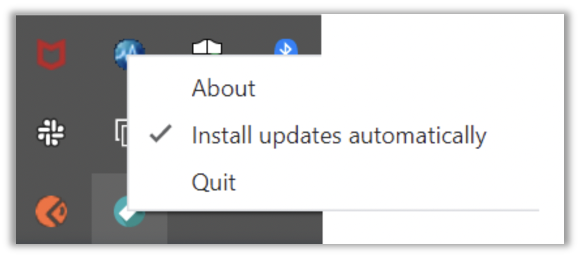
Previously, if a user was running an outdated version of Heartland Retail Connect (HRC) on a Windows computer, the app would download the latest version and make it available for installation in the user interface. Before installing, users are required to accept the terms. However, if you restarted HRC (or your computer), the update would install automatically and would not display the user acceptance prompt beforehand. We now give users the option to install updates automatically or manually, depending on their preference, with both methods requiring user acceptance before installing.
HRTL-3606 – Enable Automatic Updates for HRC on MacOS
We have enabled automatic updates of Heartland Retail Connect (HRC) for MacOS devices. When a new update is detected, it will be downloaded. While HRC is running, the update will not be installed unless the user chooses. Once the app (or the computer) is restarted, the update will install automatically. Regardless of mode of installation, the user must accept terms before installing.
HRTL-3611 – Install HRC Updates Automatically for Windows
With this release, on Windows devices, the menu tray option to install Heartland Retail Connect (HRC) updates automatically is checked by default.
Updates
The following release notes detail the updates we have included in this release.
HRTL-2391 – Fixed Unresolved Payment Issue for Manual Card Payments
We have corrected an issue that caused credit card payments applied to sales orders to be marked as unresolved in the POS when the card numbers were entered manually. In these instances, the transaction would process successfully on the payment device but not in the POS. With this release, the POS records these manually entered sales order payments correctly as expected.
HRTL-2538 – Fixed HRC User Interface Control of API Server
In previous versions, when users closed Heartland Retail Connect (HRC) by selecting Quit from the menu, it stopped HRC but did not stop the supporting API server process. Because of this, if you then attempted to restart HRC, it would fail to restart the API server since it was already running. With this release, if you close HRC, it also closes the API server as expected.
HRTL-2762 – Fixed Missing Gift Card User in Gift Card History
We have corrected an issue that sometimes omitted the name of the user who issued a gift card from gift card history, Instead, only users who redeemed gift cards were listed. With this release, gift card history captures and reflects the issuing user’s name as expected.
HRTL-3174 – Fixed Issue with High Quantity of Products with Customization
In previous versions, when users attempted to add a high quantity (for example, 50) of a customizable item to an order or ticket, it would add the item as individual units. The process would then time out and the item would not be added. With this release, the POS adds high quantities of these items as a single line, thereby preventing timeout and other issues.
HRTL-3316 – Fixed Issue Applying Promotions & Coupons with Commas in Custom Field
We have corrected an issue that prevented users from applying promotions and coupons when the associated Custom Field contained a comma. With this release, the POS applies these promotions and coupons as expected, regardless of the presence of commas.
HRTL-3409 – Fixed Duplicate Transaction Being Marked as Unresolved
In previous versions, if a user attempted to process a duplicate transaction (meaning for the same amount on the same card), when the transaction was declined, instead of marking it as such, the POS would mark it as unresolved. With this release, these transactions are marked correctly as declined.
HRTL-3417 – POS Confirmation Prompts when Refreshing Page During a Payment
We have enhanced the handling of refreshes or other interruptions that occur during payment processing to ensure the the POS displays a clear and accurate message so users can easily understand the status and take appropriate action. This includes:
- Reconciling for unresolved payments
- Sudden browser refresh
- Sudden app exit
- Complete payment with timed out terminal
- Complete payment with user inactivity for payment terminal interaction
- User aborts or cancels transaction
- Payment device is offline and/or turned off during transaction
HRTL-3447 – Fixed Promotion Conditions Clearing upon Pause | Start
In previous versions, the POS would clear conditions for promotions when users hit Start or Pause. The only way to keep the conditions intact was to save the promotion without them, select Start, and then go back in and add the conditions. With this release, the conditions save, even upon hitting Start or Pause.
HRTL-3492 – Fixed Void Ticket Issue when Reason is Required
We have corrected an issue that prevented users from voiding items from a sale when Require Reason was enabled for voiding a ticket and removing an item from a ticket. In these instances, after removing an item, they are able to select the removal reason but, when they then attempt to void the ticket, there are no void reasons to select. With this release, the void reasons display as expected.
HRTL-3522 – Fixed Print-to-PDF Issue for Invoices
In previous versions, when users attempted to print and invoice to PDF, the request timed out and the PDF was not generated. With this release, the operation completes as expected.
HRTL-3558 – Fixed Issue Processing Inventory Count Containing Non-Tracked Items
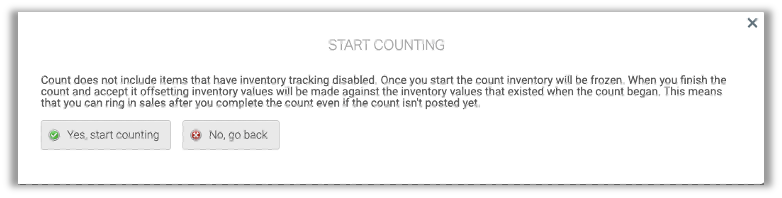
In previous versions, when users attempted to accept inventory counts including items that had inventory tracking disabled, the POS was unable to complete the action and became stuck processing the request. With this release, the POS does not include such items and displays a message to that effect when users initiate a count.