Overview
The following release notes contains updated versions of the following files:
If you have questions regarding the updates described in this document, please contact Heartland Restaurant’s Support Department by email (hrpossupport@heartland.us ) or phone (1-833-844-HPOS).
What's New
AdminSite
HR-5328 Toggle All ON/OFF on Import/Export page
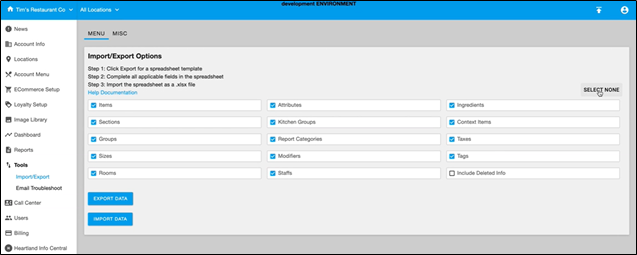
With this enhancement, users now have the ability to toggle all checkboxes on/off using the Import/Export tool so it’s no longer necessary to select/deselect each individual checkbox. The new toggle button is located under the Menu tab and displays SELECT ALL/SELECT NONE. Note that it’s still possible to select/deselect individual checkboxes allowing you to customize the information displayed.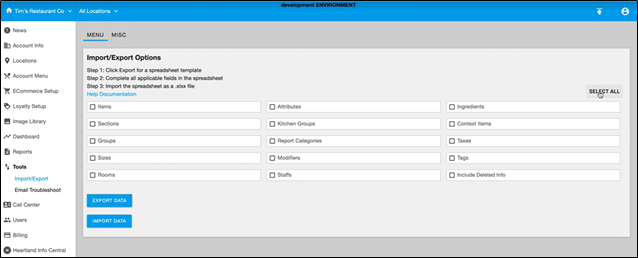
Admin; POS
HR-5767 QSR implementation
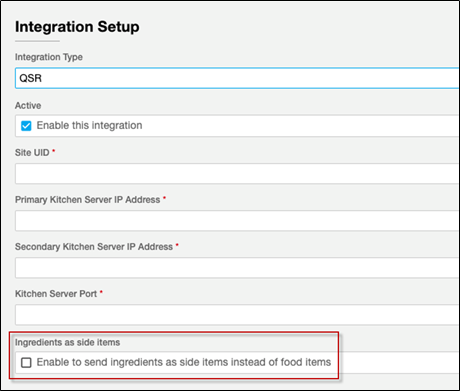
Previously, Ingredients could only be sent to QSR as food items. With this enhancement, we have added a Side Items checkbox to the Integrations Setup screen allowing users the option to send Ingredients as a food item or as a side item to consolidate ingredients correctly.
Updates
AdminSite
HR-4841 Quickbooks - Defaults Clearing Daily
If your site uses Quickbooks Online, you may have encountered an issue. In previous versions, the Admin Console may have failed to save its default settings for the Quickbooks interface requiring merchants to log out and log back into Quickbooks to restore the default settings.
While investigating another Quickbooks Online issue regarding default settings, we found that the authentication method changed to report results back to non-authentication calls. We have added the non-authentication calls to the authentication saving method, so failures will no longer occur.
Note: If you are currently signed out of Quickbooks Online, the problem will still occur and you will need to sign in again.
POS
HR-4288 SAF red indicator bar not disappearing when Connection resumes
Previously, some users may have experienced an issue where the location was online and processing cards successfully, but the DSS iPad was showing the red SAF status bar at the top of the screen indicting they were processing offline and had one pending transaction. This issue has been corrected so now when users have previously been offline and then resumed online processing the SAF red indicator bar is no longer displaying incorrectly.