Overview
The following release notes contains updated versions of the following files:
- Admin Console
- POS
- Online Ordering
- KDS
If you have questions regarding the updates described in this document, please contact Heartland Restaurant’s Support Department by email (hrpossupport@heartland.us ) or phone (1-833-844-HPOS).
What’s New?
The following release notes detail the updates we have included in this release.
HR-2514 Support for Two Decimal Spaces in Tare Weight Measurements
We have modified the POS to support two decimal places for integrated weighted measurement. Now, if you site uses weight scales for tare weighted items, the POS will now accept and display weights with two decimal places. It will also display tare weights with two decimal places in the Customer Display and on printed tickets.
HR-5529 Use Menu Groups or Sections in Online Order Navigation Bar
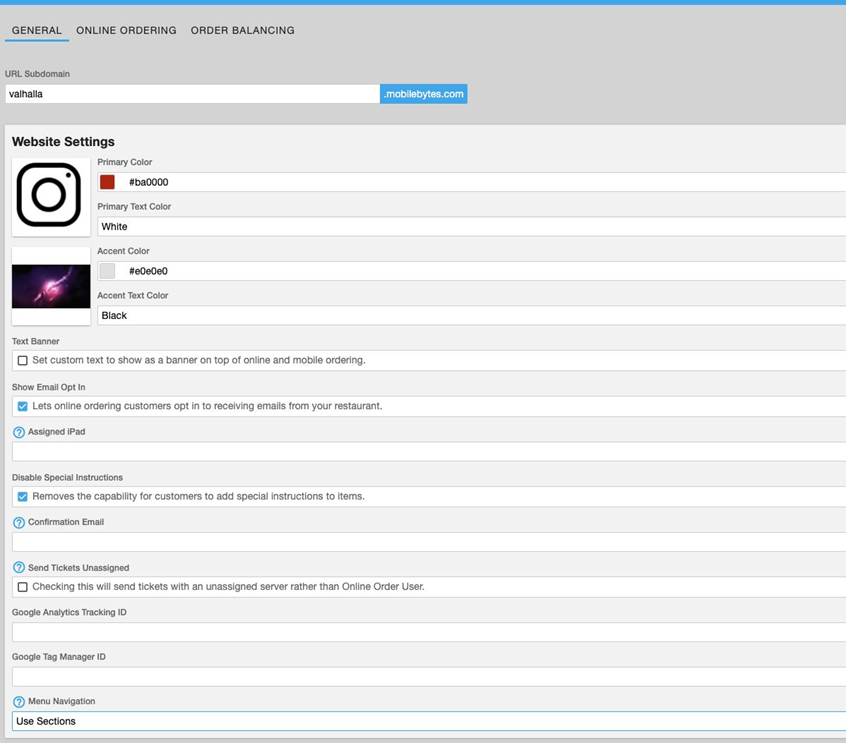
We have added the Menu Navigation list to the Online Ordering settings. In the Admin Console, access an account that uses Online Ordering. In the Main Menu, click Location Setup, then click Online Ordering. In the Online Ordering Settings screen, General tab, we have added the Menu Navigation list. This list enables you to set the Online Ordering website to display menu groups or menu sections in its navigation bar. If you select Use Groups, the Online Ordering website will display menu groups in the navigation bar, allowing customers to view different menu groups. If you select Use Sections, the Online Ordering website will display menu sections in the navigation bar, allowing customers to view different menu sections. This option allows you to use either menu groups or menu sections as a means of differentiating sets of menu items within the Online Ordering website.
Updates
The following release notes detail the updates we have included in this release.
HR-1344 KDS Displays Sizes and Modifiers in Real Time
In previous versions, the POS may have failed to display item sizes and modifiers in real time in the KDS. In the Admin Console, in the Display Formats screen, if you select Real-time in the On the Fly KDS list, the POS sends new menu items to the KDS as soon as they are added to a ticket. However, in previous versions, if you added an item to a ticket and then added a size or universal modifier to the item, the POS may have displayed the item but not its size or modifier. In such cases, the POS only displayed the item’s size or modifier after you tapped Send. We have corrected this, and now when you add a size or universal modifier to an item, the POS now displays them immediately in the KDS.
HR-1856 Multiple Overlapping Time Punches for Staff Members
In previous versions, the POS may have recorded erroneous overlapping time punches for staff members. For instance, if a server clocked in at 7:30am on a given day, the POS may have entered another clock-in time for the same server on the same day at 9:00am. In certain circumstances, the POS would “reload” old time punch entries, creating inaccurate and overlapping time punches for some staff members. We have corrected this, and the POS no longer reloads old time punch entries into the records for new dates.
HR-2231 Adding Tips to QR Code Gift Transactions
In previous versions, if a customer paid a ticket with a gift card with a QR code, the POS may have failed to add the customer’s tip. Specifically, if you scanned a gift card’s QR code on an iPad and then allowed the customer to enter a tip amount, the POS may not have added the tip to the ticket. (If the customer entered a tip amount on a PAX device, it would process properly.) We have corrected this, and the POS now accepts and processes tips properly when they are entered after scanning a gift card’s QR code.
HR-2384 Gift Card Partial Payment in Online Ordering
In previous versions of the Online Ordering website, if a customer made a partial payment with a gift card, then paid the remaining amount with a credit card, the program may have effectively “ignored” the gift card, charging the ticket’s full amount to the credit card without deducting any funds from the gift card. For instance, on a ticket with a total of $50, if a customer used a gift card to make a partial payment of $20 and then used a credit card to pay the remaining $30, the Online Ordering website may have deducted no funds from the gift card and instead charged $50 to the credit card. We have corrected this, and the Online Ordering website now deducts partial payments properly from gift cards.
HR-2497 Adding Initial Tips to QR Scanned E-gift Card Transactions
In previous versions, after scanning an e-gift card’s QR code to pay a ticket, if a customer then tried to add an initial tip to the transaction, the POS may have quit and closed abruptly. If you entered an e-gift card by manual entry and then added an initial tip, the POS would add the tip properly without crashing. The problem only occurred when an e-gift card was entered by scanning its QR code. We have corrected this, and the POS no longer closes when you add an initial tip to an e-gift card transaction.
HR-4291 iPad IP Addresses Resetting on Sites Using PAX Devices
In previous versions, if you have an account that included one location using PAX devices and another location using Ipp320 devices, you may have encountered a problem. In certain circumstances, the iPads in the location using PAX devices may have had their IP addresses reset improperly. Specifically, the program replaced the iPad IP addresses with MAC addresses from the Ipp320 devices at the other location. In such cases, if you reviewed each iPad's device settings in the Admin Console, they would appear to have the proper IP addresses, even if the addresses were reset in each device. We have corrected this, and the program no longer resets the IP addresses of iPads running on sites that use PAX devices.
HR-5924 No Reported Tips from Deleted Shifts in the Tips & Payouts Report
In previous versions, the Admin Console may have included reported tips from deleted shifts in the Tips & Payouts Report. In the Admin Console, in the Time Punches screen, if you deleted a shift with reported tips, the program would exclude those tips from the totals in the Time Clock Report, but it may not have excluded them from the Tips & Payouts Report. We have corrected this, and the Admin Console no longer includes reported tips from deleted shifts in the Tips & Payouts Report.
HR-7162 Closed Tickets No Longer Reopening
In previous versions, after closing a ticket on one POS device, the ticket may have appeared to “reopen” later on another POS device. For instance, if you closed a ticket on one POS device, it may have reappeared as an open ticket the following day on a different POS device. In such cases, if a ticket was locked while being edited on one device, the POS may have improperly allowed someone to close the ticket on another device. In such cases, the POS may have reopened the closed ticket when it unlocked it. We have corrected this, and the POS no longer reopens closed tickets.
HR-7437 Time Clock Report Loads Properly
In previous versions, if you accessed the Time Clock Report in the Admin Console, the program may have failed to load the report. In certain circumstances, the program was unable to load the data into the report properly. We have corrected this, and the Admin Console now loads and displays the Time Clock Report properly.