Overview
This document describes the following enhancements and updates:
- Inventory Management
- Point of Sale
If you have questions regarding the updates described in this document, please contact the Heartland Retail support team.
What’s New
The following release notes detail the enhancements we have included in this release.
HRTL-4702 – Implement ‘Available Online’ Feature for Gridded Items
With this release, merchants can now flag gridded items as Available Online. This option can be set at grid level to apply to all items in the grid, or at the grid item level for individual designation. If set at grid level, the field will not be editable at item level.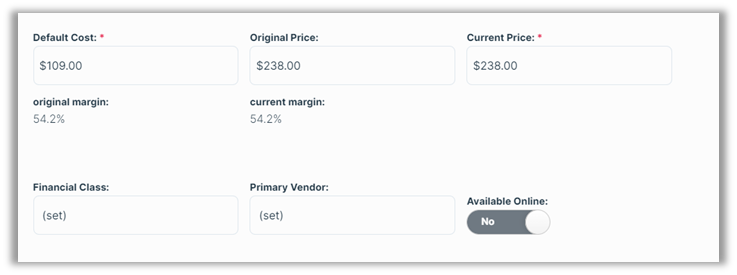
Please note that this option displays only if the new Add Online Toggle on Items and Grids setting is enabled, as described in HRTL-4720.
HRTL-4713 – Add ‘Save & Add New’ Option to Create/Edit Item Screen
For added convenience and efficiency, we have added a Save & Add New button to the Item page during when creating or editing an item.
With this button, users can save the current item and begin adding a new item in a single step.
HRTL-4720 – Create ‘Add Available Online Toggle on Items and Grids’ Setting
With this release, we introduce an Add Available Online Toggle on Items and Grids option to the Inventory settings.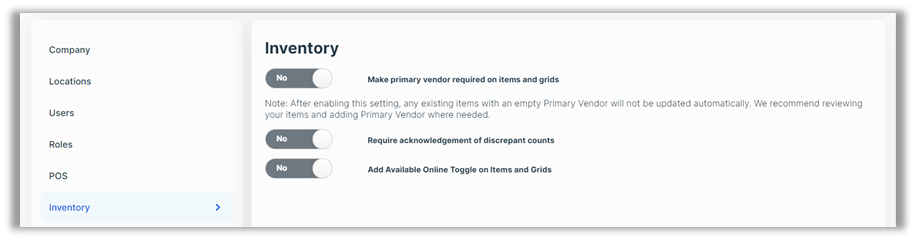
When this toggle is set to Yes, merchants can then designate gridded items as Available Online, as described in HRTL-4702.
Updates
The following release notes detail the updates we have included in this release.
HRTL-4580 – Fixed Receiving Issue When PO Search Field Contains Numbers
In previous versions, if you entered a number in the search field when receiving items on a purchase order, you could select multiple line items to receive them, but only one item would actually be received. The only way to receive multiple items was to first delete the information in the search field. With this release, all checked items are received as expected.
HRTL-4585 – Fixed ‘Use Original Price’ Adjustment Issue
In previous versions, if you changed the price of an item on a sales order and then attempted to change it again, selecting Use Original Price, the POS encountered validation errors and failed to handle the request. With this release, the POS adjusts the price as expected and without error.
HRTL-4694 – Fixed Tax Removal Issue
In previous versions, merchants were sometimes unable to remove taxes from tickets. This occurred when, after returning an item from a previously closed ticket, they added an item to the ticket with a price higher than that of the returned item. In these cases, if they selected Remove Tax, the POS failed to remove the taxes. With this release, the POS removes the taxes as expected.
Links
Here are links to download the latest version of Heartland Retail Connect: