Overview
This document contains explanations for the following enhancements:
- Mobile App
- Admin Console
- Other
If you have questions regarding the updates described in this document, please contact Heartland Mobile Manager Support by email at hmm@heartland.us.
Enhancements
The following release notes detail the enhancements we have included in this release.
Mobile App
HMMC-8166 Updated Notifications Wording
With this enhancement, the wording in Mobile App notifications has been updated to be clearer and more concise.
Examples:
- Previously: Labor Cost % for {store name} cannot be evaluated during {dayPartName} because the Sales total is zero.
- Current: Labor % cannot be evaluated during {dayPartname} because the Sales total is zero.
- Previously: Month Goal has been achieved for {store name}.
- Current: {store name} achieved the Monthly Sales Goal.
- Previously: A new task is created by {user name}.
Current: {user name} created a new task.
HMMC-9000 Always Use ‘Today’ as Last Day in Sales Heat Maps
With this enhancement, today’s sales will now always be shown as the last day in sales heat maps, allowing you to compare today’s sales with six days before to give you a more accurate comparison. Note that a day is in 12-hour format and begins at the starting time of the store.
HMMC-9001 Improved Filter Logic
With this enhancement, we have approved filter logic; assuming you have more than one store, you can use the store filter to select to view all stores or make no selection, the reports related to all stores data will display rather than the POS displaying no data. Note you can still use the store filter to select to see one or more specific store’s data while excluding others.
Admin Console
HMMC-8640 Added Dealer as an HMM Support Email Recipient
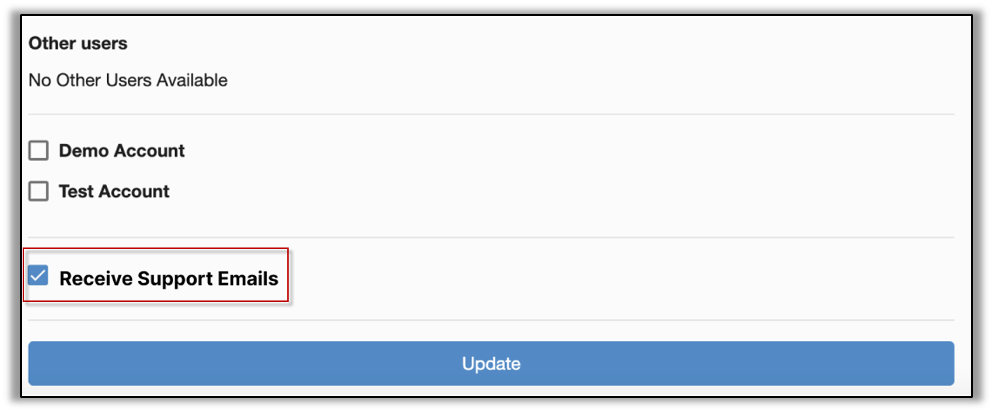
With this enhancement, Dealers will now automatically receive HMM Support emails; these emails are created based on reported issues encountered with the Mobile App by users of stores they are working with; adding Dealers to these important emails will make them aware of users’ issues.
To access this setting, from the Admin Console, select Users then your Dealer page and you can see the Receive Support Emails checkbox. Select the checkbox to enable/disable the feature, then Update. Only users with Dealer, Support, and Admin access level can enable/disable the checkbox.
Note the Receive Support Emails checkbox is enabled by default; if you don’t wish to receive these emails, you must uncheck the box to disable the feature.
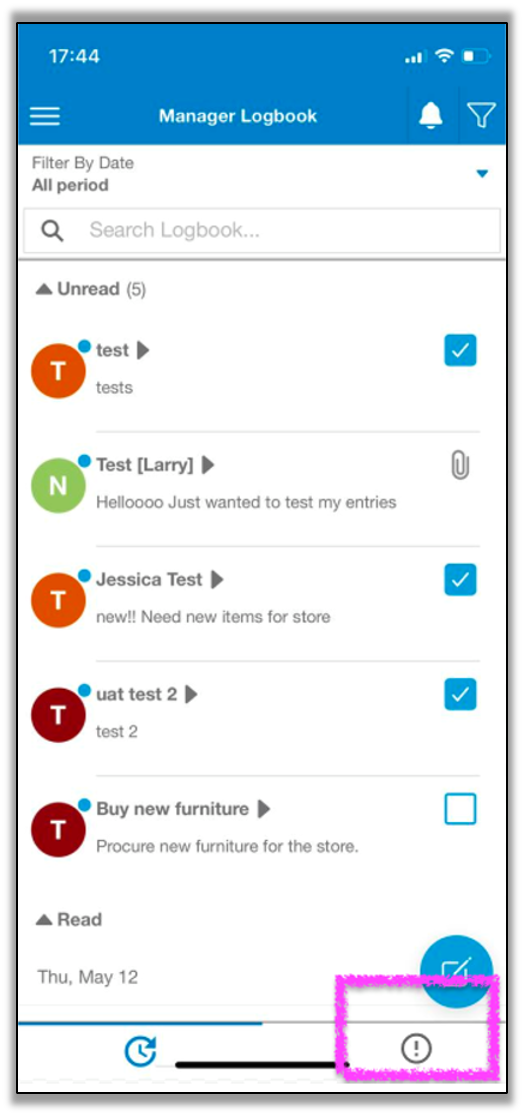
HMMC-9014 Updated Icon for 'Most Important' Tab
With this enhancement, within the Manager Logbook, we have updated the icon for the ‘most important’ tab to an exclamation point (!) so users can clearly understand the tab’s purpose.
Other - Email
HMMC-8942 Added POS Support as an HMM Support Email Recipient
With this enhancement, POS Support (pcamerica, Digital Dining, Dinerware, Heartland Restaurant, and Heartland Retail) will receive HMM Support emails related to users of stores with the affiliated POS; adding POS Support to these important emails will make them aware of users’ issues.