Overview
This document describes the following enhancements and updates:
- Payments
- Point of Sale
- Promotions & Coupons
- Roles & Permissions
If you have questions regarding the updates described in this document, please contact the Heartland Retail support team.
What’s New
The following release notes detail the enhancements we have included in this release.
HRTL-4414 – Add Transaction Type Filter for Card Transactions in Analysis Reports
To compliment the recent addition of PIN debit functionality, we have now added a transaction type filter for card transactions in analysis reports so merchants can easily distinguish between debit and credit card transactions.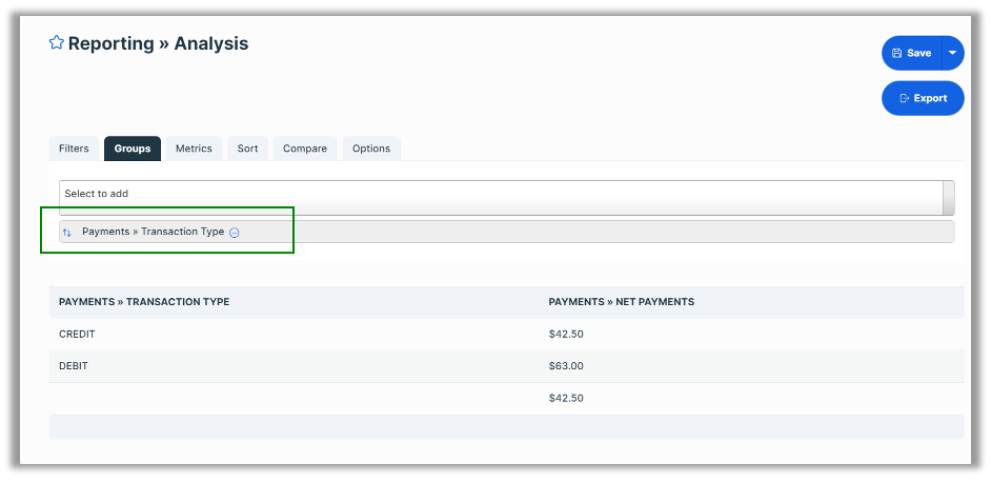
Users can view totals for all types or they can filter transactions to show only credit or debit.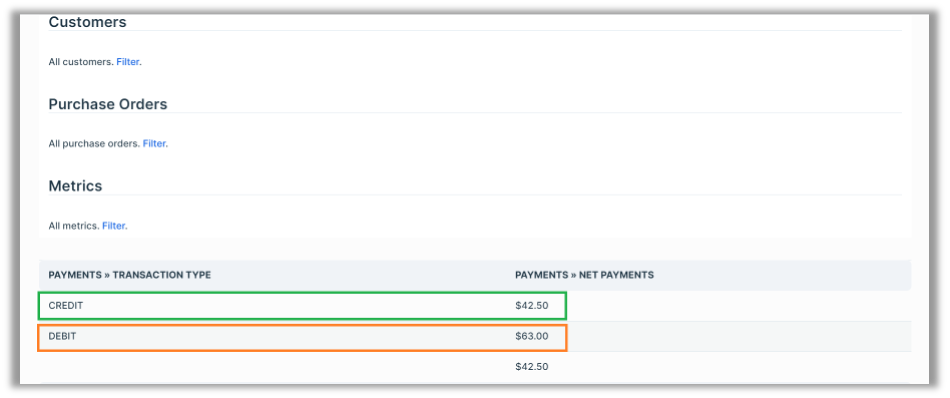
HRTL-4701 – Validate Portico Credentials Upon Saving
With this release, the POS now validates Portico payment credentials upon saving in the Settings | Credit Card page. This failsafe ensures that, when processing credit card payments, merchants will not encounter authentication issues resulting from invalid credentials. If you enter invalid credentials, the POS will display a message to that effect and will not save the values until they pass validation.
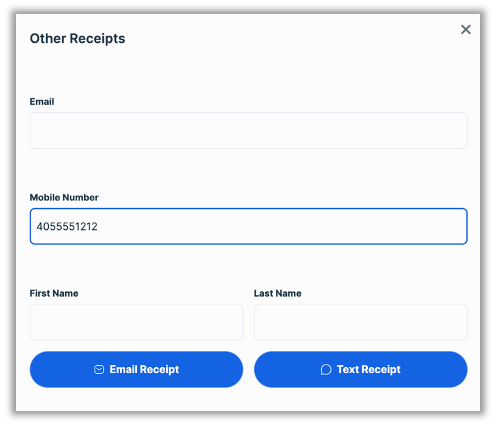
HRTL-4870 – Do Not Require First / Last Name for ‘Other Receipts’
This release no longer requires first and last names on the Other Receipts page, whereas previous versions required users to complete these fields.
Updates
The following release notes detail the updates we have included in this release.
HRTL-822 – Improved Error Message When Deleting a Previously Used Coupon
In previous versions, if a user attempted to delete a coupon that had been previously used, the POS displayed an unclear message stating, ‘Request invalid’. With this release, in such instances, the POS displays a clear message stating, ‘Coupon is attached to sales and cannot be deleted.’
HRTL-2846 – Fixed PAX A920 Portico Crash When Removing 15+ Items from a POS Ticket
In previous versions, if you attempted to remove 15 or more items from a ticket at a workstation using a PAX A920, the Portico app on the device would sometimes crash. In these cases, if you then attempted to process a payment on the device, it would fail and give an ‘UNSUPPORT EDC’ error until the Portico app was relaunched. With this release, the Portico continues running as expected when removing items from POS tickets.
HRTL-4501 – Fixed Required Fields Behavior When Creating New User
In previous versions, when creating a new user, many of the following required fields were not displayed as such.
- Username
- New Password
- Re-enter New Password
- Roles
- Locations
Each of these fields should display in red, indicating that you must enter a value. However, only the Username field displayed in red. With this release, all required fields display in red as expected.
HRTL-4875 – Fixed Customer Address UI Reskin Issue
In previous versions, if a customer had more than one address in their profile, the POS sometimes mishandled the Default, Billing, and Shipping checkbox selections. In these cases, if you checked one or more of these boxes for anything other than the first address listed, the POS would still select the first address and would not allow you to change it. With this release, the POS allows you to check these designations for any address in the list as expected.
HRTL-4967 – Fixed Coupon Issue When Customer is Removed
In previous versions, if you applied a coupon with a customer condition and then removed the customer, the POS removed the coupon along with the customer and updated the total as expected. However, it would display an erroneous ‘Customer is required’ message when you attempted to apply a payment to the ticket. With this release, the POS handles these cases as expected and does not display the message.
Links
Here are links to download the latest version of Heartland Retail Connect: