Overview
This document contains explanations for the following enhancements:
- Mobile App
If you have questions regarding the updates described in this document, please contact Heartland Mobile Manager Support by email at hmm@heartland.us.
What’s New
The following release notes detail the enhancements we have included in this release.
Mobile App
HMMC-9082 Enhance Behavior of Notifications for Logged Out User
With this enhancement, when a user who is logged out of the mobile app taps a notification on their mobile device, the app will open so that the user may log in and will then immediately take them to the Notifications page, thereby eliminating the need to manually navigate to the page.
HMMC-9208 Add Back Button to Return to Previous Page from Notifications
To facilitate backward navigation after viewing notifications via the bell icon, the app now displays a back arrow in the upper left area of the screen. If you tap the back arrow, the app will return you to the previous page.
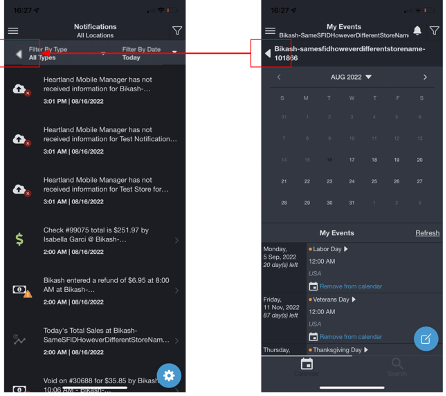
Please note that the back button displays only when users access notifications via the bell icon. It does not display if users browse to notifications via the menu button.
HMMC-9235 Add ‘Mark All as Read’ Option to Notifications Page
With this release, we have added the option to mark all unread notifications as read in a single action. To use this feature, from the Notifications page, tap the gear icon from the lower right corner to view settings, then select Mart all notifications as read.
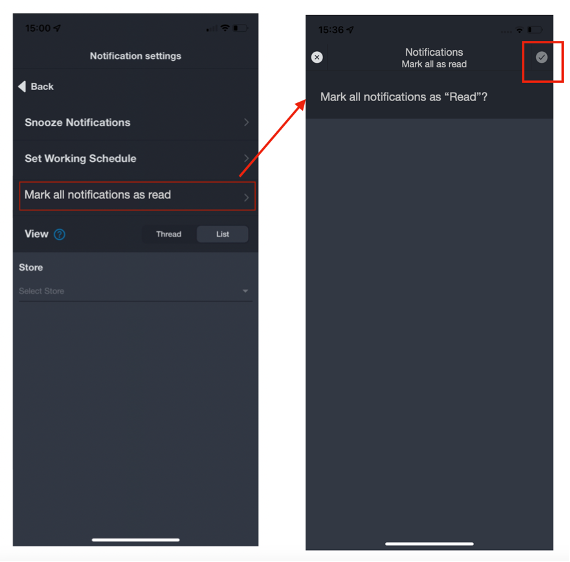
At the confirmation prompt, tap the checkmark button to proceed with the action, or tap the X button to cancel.
HMMC-9247 Implement Consistent Colors for Tab Icons & Text in Dark Mode
For a friendlier user experience, the mobile app now uses consistent coloring for all tab icons and their corresponding text when in dark mode.
- Active tabs will display icons in blue and text in white.
- Inactive tabs will display icons and text in grey.